How to Choose the Best TFT Touch Screen for Your Project?
When embarking on a project requiring a TFT touch screen, making the right choice can be daunting. The market offers numerous options, each with unique features. Understanding your specific needs is crucial. Factors like display size, resolution, and touch sensitivity must align with your project's objectives.
TFT touch screens are renowned for their vibrant displays and user-friendly interfaces. However, it's essential to evaluate the specifications critically. Not every screen fits every application. Some may be too large or outdated for your needs, while others may lack durability for rugged environments.
Navigating this landscape requires a careful balance between functionality and cost. You might be tempted to choose the cheapest option, but that can lead to regrets. A reliable TFT touch screen can enhance user experience significantly. It’s easier to overlook certain features but they contribute to long-term satisfaction.
Understanding TFT Touch Screen Technology and Its Applications
TFT touch screen technology has transformed interface design across various industries. These displays use thin-film transistor technology to provide clearer images and faster response times. A report by MarketsandMarkets indicates that the global market for TFT displays is expected to grow to $92 billion by 2025. This growth is fueled by the rising demand for high-resolution screens in sectors like automotive and consumer electronics.
Applications of TFT technology are diverse. In the medical field, for instance, TFT screens enhance the usability of diagnostic equipment. Lifecycle Management Consulting estimates that TFT displays improve operational efficiency by up to 30% in healthcare settings. However, selecting the right TFT touch screen isn't straightforward. Factors like resolution, screen size, and touch sensitivity play critical roles in ensuring the display meets project needs.
While the advantages are evident, users often face challenges. Variability in manufacturing can lead to discrepancies in quality. It's vital to consult with experts to navigate these complexities. Not all manufacturers provide consistent performance, making it essential to evaluate several options. Users must weigh aesthetics against functionality. Balancing these elements can be tricky, yet it's crucial for project success.
How to Choose the Best TFT Touch Screen for Your Project?
| Feature |
Description |
Importance |
Typical Applications |
| Screen Size |
The diagonal measurement of the display. |
High |
Consumer electronics, industrial controls |
| Resolution |
The number of pixels displayed on the screen. |
Very High |
Multimedia gadgets, medical devices |
| Touch Technology |
Resistive or capacitive touch response. |
High |
Interactive kiosks, smart home devices |
| Brightness |
Measure of light output of the screen. |
Medium |
Outdoor displays, automotive displays |
| Interface |
Communication protocol (SPI, I2C, etc.). |
High |
Microcontroller-based projects, Raspberry Pi |
| Viewing Angle |
The angle from which the display can be viewed. |
Medium |
Digital signage, public displays |
Key Specifications to Consider When Selecting TFT Touch Screens
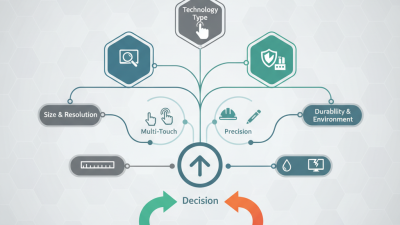
When selecting a TFT touch screen for your project, consider several key specifications.
First, the resolution is critical. A higher resolution provides clearer images and finer details.
Look for screens that offer at least 800x480 pixel resolution for better clarity in applications.
Brightness also plays a significant role. A brightness of 300 nits or above is generally suitable for direct sunlight exposure.
Touch sensitivity is another important factor. A highly responsive touch screen can improve user experience.
However, some devices may have a laggy response time. Evaluating customer reviews can help you gauge real-world performance.
The type of touch technology—resistive or capacitive—also influences usability. Capacitive screens usually deliver superior touch accuracy.
Here are some tips:
- Check the screen's viewing angle. A wide viewing angle prevents image distortion from the sides.
- Additionally, assess the screen’s durability. Projected capacitive screens tend to be more robust.
- Finally, remember to validate the driver compatibility with your microcontroller or hardware. This ensures seamless integration into your project, avoiding potential headaches.
Evaluating Resolution and Color Depth for Optimal Display Quality
When choosing a TFT touch screen, resolution and color depth are critical factors. Higher resolution means more pixels, resulting in sharper images. For projects requiring detailed visuals, a resolution of at least 800x600 is ideal. However, some may need full HD or better. It’s essential to match the resolution with the intended application. A lower resolution might suffice for basic tasks, but it falls short in graphical displays.
Color depth also significantly impacts display quality. A screen with 16-bit color depth can show over 65,000 colors. This might seem sufficient, but many applications benefit from 24-bit color, displaying more than 16 million hues. The richness of the display affects user experience, especially in graphics-intensive projects. Yet, higher color depth can increase processing demands. This could lead to slower performance on less capable hardware.
Evaluating these parameters requires careful consideration. Potential users must analyze their specific needs. Balancing between a vibrant display and system capabilities is not always easy. Understanding the project's requirements is necessary for making informed decisions. Choosing the right TFT touch screen is a blend of technical knowledge and practical application, and it can be challenging to strike the perfect balance.
Importance of Touch Sensitivity and Response Time in User Experience
When selecting a TFT touch screen, the importance of touch sensitivity and response time cannot be overlooked. High touch sensitivity ensures that your users can interact with the device smoothly. A responsive screen will recognize subtle movements, allowing for a natural user experience. Users often expect instant feedback when they tap or swipe. A delay can lead to frustration and hinder usability.
Effective touch sensitivity balances accuracy and responsiveness. A screen that is overly sensitive may register accidental touches. This can disrupt the flow of interaction. On the other hand, a screen that is not sensitive enough could miss intended gestures, causing confusion. It's crucial to test various screens in real-world scenarios. Observing user interactions will provide insights into how well the device performs in practice.
Response time is equally significant. A screen that reacts quickly gives users confidence in their actions. Delays in response can make people feel they are losing control. They may give up on using the device or, worse, develop a negative perception. Aim for a response time under 10 milliseconds for optimal performance. This ensures a fluid experience, reducing the likelihood of errors and improving overall satisfaction.
Touch Sensitivity and Response Time Analysis
Comparing Cost-Effectiveness of Different TFT Touch Screen Models
When selecting a TFT touch screen for your project, understanding cost-effectiveness is vital. Different models offer various features and price points. You might find a low-cost option appealing but overlook performance aspects. Budget screens sometimes lack reliability. This can lead to higher long-term costs due to maintenance or replacement.
Consider the resolution, brightness, and touch sensitivity of each model. They can significantly impact user experience. A model may appear affordable, but if it underperforms, the price advantage diminishes. Assessing these factors helps in making a well-rounded decision.
Also, think about long-term support. Some manufacturers offer better documentation and customer service. This support can be crucial when you face issues during the project. Researching user experiences and expert reviews can provide insights. It’s essential to weigh the initial cost against potential future expenses. A slightly more expensive model might save money in the end.