What is a Usb Touch Monitor and How Does it Work?
In today's digital landscape, the demand for interactive displays is on the rise. A USB touch monitor is a prime example of this technology. According to a report by Grand View Research, the global touch screen market is expected to reach $87.1 billion by 2027. USB touch monitors play a key role in this growth.
These monitors offer a blend of functionality and user engagement. They enable seamless interaction, enhancing productivity across various industries. Individuals and businesses alike appreciate their ease of use and compatibility with existing devices. However, the market is not without its challenges. Compatibility issues can arise, and some users report lag in touch response.
Despite these drawbacks, the potential of USB touch monitors remains significant. Their applications range from retail to healthcare. As more organizations adopt this technology, continuous innovation is vital. Understanding how a USB touch monitor works can empower users to leverage its capabilities fully.

What is a USB Touch Monitor?
A USB touch monitor is a sleek device that combines a touch-sensitive screen with USB connectivity. It allows users to interact directly with content displayed on the screen. This interaction enhances usability and improves workflow. The monitors come in various sizes and resolutions, catering to different needs. You can use them for digital signage, educational purposes, and interactive kiosks.
How does it work? The technology behind touch monitors often involves capacitive or resistive touch sensors. Upon touching the screen, the device detects the location and translates that into actions on the computer. This seamless integration with computers and laptops is a game changer. For instance, you can scroll through documents or zoom in on images with simple finger movements.
However, not all USB touch monitors offer the same experience. Some might have lag, affecting responsiveness. Users may find that calibration is necessary for accurate touch recognition. While most monitors claim ease of use, some individuals may struggle initially. This variability can lead to frustration, prompting a rethink of expectations. Overall, USB touch monitors present both opportunities and challenges in everyday technology use.
What is a Usb Touch Monitor and How Does it Work?
| Dimension |
Description |
Value |
| Screen Size |
Measured diagonally |
15.6 inches |
| Resolution |
Pixel dimensions |
1920 x 1080 (Full HD) |
| Touch Technology |
Method of touch detection |
Capacitive |
| Connectivity |
Types of connections available |
USB 3.0, HDMI |
| Operating System Compatibility |
Supported OS |
Windows, macOS, Linux |
| Power Supply |
Power requirements |
5V via USB |
Key Features of USB Touch Monitors
USB touch monitors are revolutionizing the way we interact with technology. These devices combine the functionality of a display and a traditional touch interface. They connect via USB, simplifying setup and enhancing usability. According to industry reports, the global market for touch monitors is expected to reach $11 billion by 2025, showcasing significant growth.
Key features of USB touch monitors include their multi-touch capabilities. This allows multiple users to interact with the screen simultaneously, ideal for collaborative workspaces. A report by MarketsandMarkets highlights that 39% of users prefer touch interfaces for ease of use. The responsiveness of these screens is another critical aspect. Many USB touch monitors respond to touch inputs within milliseconds, which is essential for applications in gaming or point-of-sale systems.
USB touch monitors are designed for versatility. They are lightweight and portable, making them suitable for various environments. However, the reliance on the USB standard can sometimes limit connectivity options with other devices. Additionally, while their ease of use is a benefit, some users find themselves unsure about the functional limits of touch control compared to traditional input methods. Understanding these features and limitations is vital for maximizing the benefits of USB touch technology.
Key Features of USB Touch Monitors
How USB Touch Monitors Function Mechanically
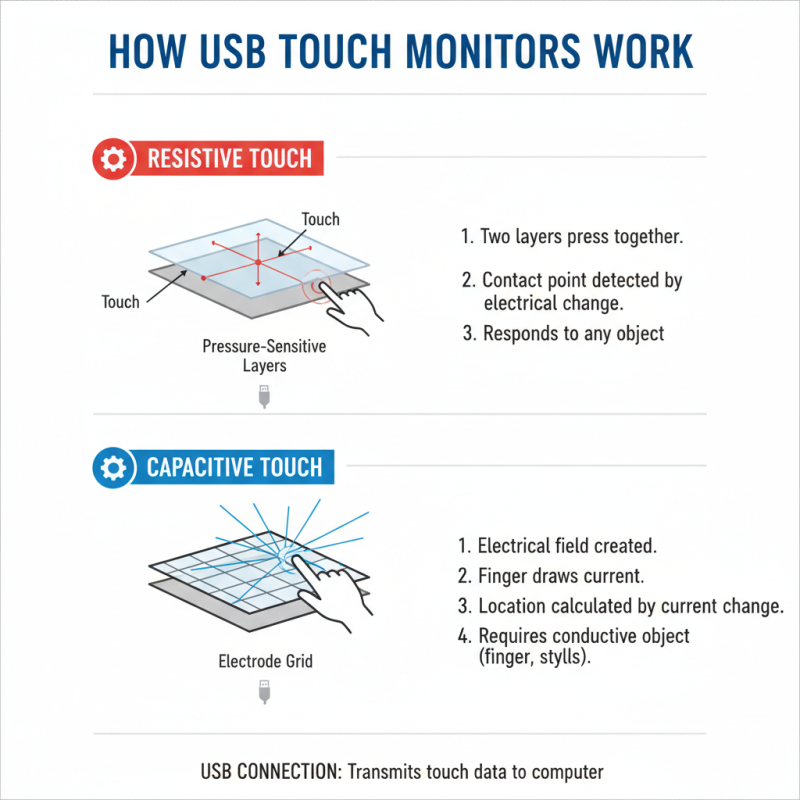
USB touch monitors combine the capabilities of regular displays with the interactivity of touch input. Mechanically, they rely on various technologies to detect touch. The most common are resistive and capacitive systems. Each system has its unique way of interpreting user interactions.
Resistive touch monitors use two flexible layers separated by a small gap. When pressure is applied, the layers touch each other, registering the location. This design allows for precise input but tends to wear out over time. Users might find issues like delayed responses or sensitivity loss after prolonged use. Capacitive systems, on the other hand, employ an electrostatic field around the screen. They detect changes in capacitance when a conductive object, like a finger, makes contact. This method offers quicker responses, but it may struggle with non-conductive materials, meaning it can be less versatile in some situations.
These mechanisms illustrate the evolution of USB touch monitors. The choice between them depends on user needs. Both technologies have their pros and cons. It's crucial to consider these factors before investing in a touch monitor. Understanding these mechanics can help make more informed decisions.
Connecting a USB Touch Monitor to Your Device
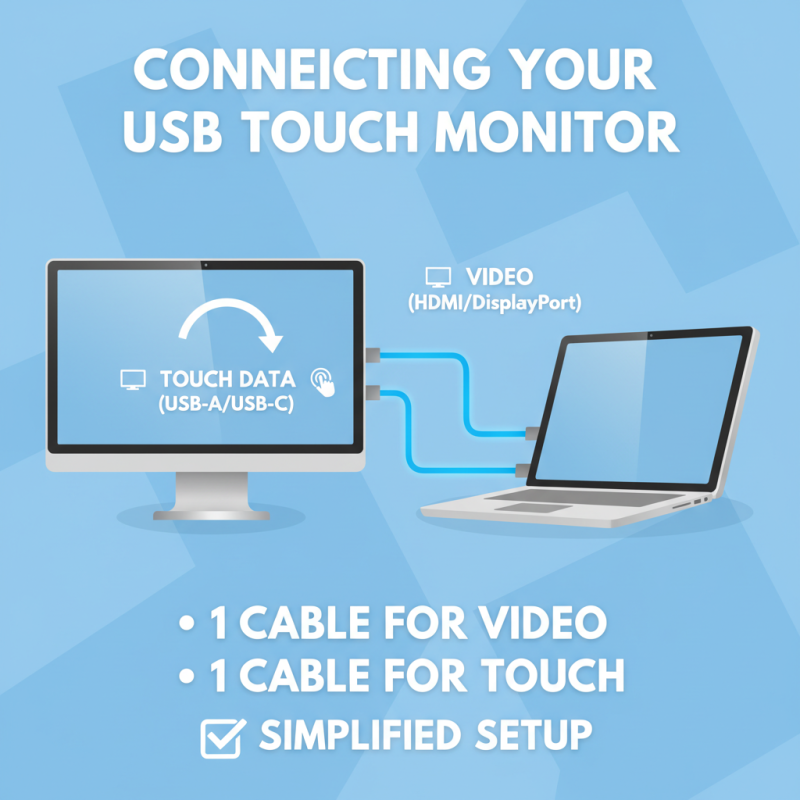
Connecting a USB touch monitor to your device can seem straightforward, but there are several details to consider. Most USB touch monitors require a standard USB connection, ensuring the touch functionality works seamlessly. You’ll often connect one cable for video and another for touch data. This dual connection can simplify setups significantly.
When you first plug in a USB touch monitor, your device may automatically recognize it. If it doesn't, you might need to install drivers. Sometimes, this process can be frustrating. Not all devices support every USB touch monitor. Compatibility issues can arise, depending on the operating system and device model. Testing compatibility before purchase can save you time and effort.
Moreover, positioning matters. A poorly placed monitor can hinder touch accuracy. Consider adjusting the angle for a better experience. You also need to calibrate the monitor, especially if you notice any discrepancies in touch responses. This adjustment allows for a more precise interaction. Each connection step might seem simple, but attention to these details can significantly improve your overall experience with USB touch monitors.
Common Applications for USB Touch Monitors
USB touch monitors have gained popularity in various applications due to their versatility and ease of use. One common application is in retail environments. Stores utilize these monitors for point-of-sale systems. The touch interface allows for quick transactions and enhances customer interaction. Shoppers appreciate the user-friendly design. It makes the purchasing process smoother and faster.
Another important application is in education. Classrooms increasingly integrate technology into learning experiences. Teachers use USB touch monitors for interactive lessons. Students can engage directly with the material. This method of learning fosters collaboration and creativity. However, reliance on technology can raise questions about engagement and distractions.
Healthcare also benefits from USB touch monitors. Medical staff use them for patient information management. Touch interfaces streamline the process of data entry and retrieval. This aids in improving patient care. Yet, it poses challenges. Staff must balance the speed of technology with the personal touch that patients expect. Each application showcases the potential of USB touch monitors while highlighting the need for thoughtful integration.