10 Essential Tips for Choosing the Best LCD Touch Monitor
Choosing the right LCD touch monitor can significantly impact your daily activities, whether for business or personal use. An ideal monitor offers not only responsive touch capabilities but also excellent clarity and reliability. It is essential to consider various factors before making a purchase to ensure you select the best option for your needs.
Many people overlook the importance of screen resolution and response time. These features can greatly affect user experience. Additionally, the size and design of the monitor should fit well with your workspace. Some may find a larger screen cumbersome, while others might prefer a more compact unit. Quality matters. Not all monitors are built to last, and finding a reputable brand is crucial.
Reflecting on your specific needs can help guide your choice. Take time to think about how you will use your LCD touch monitor. Will it be for professional presentations or casual browsing? Such questions can refine your search and lead to a more satisfying purchase. Ultimately, investing in the right equipment pays off in productivity and comfort.
Factors to Consider When Choosing an LCD Touch Monitor Size and Resolution
When choosing an LCD touch monitor, size and resolution are pivotal factors. A suitable screen size can enhance user experience. For instance, larger monitors are better for immersive applications, while smaller screens fit compact spaces. Think about your workspace. Measure it before making a decision. This prevents unpleasant surprises later.
Resolution is equally significant. Higher resolutions provide detailed images. They improve clarity in applications requiring precision, like graphic design or medical imaging. Consider your primary use. If you’re viewing text-heavy content, a full HD resolution might suffice. However, for detailed graphics, opt for higher resolutions.
Tip 1: Always check the pixel density. A higher pixel density yields sharper images. Tip 2: Analyze your typical distance from the screen. If you sit far away, a lower resolution may still look adequate. Adjust your expectations accordingly. Not all tasks require the highest resolutions. Think critically about your needs before finalizing your choice.
10 Essential Tips for Choosing the Best LCD Touch Monitor - Factors to Consider When Choosing an LCD Touch Monitor Size and Resolution
| Factor |
Description |
Recommended Size |
Recommended Resolution |
| Screen Size |
Choose a size that fits your workspace and usage needs. |
15" - 32" |
1920x1080 (Full HD) |
| Touch Technology |
Different technologies (resistive vs capacitive) offer varied experiences. |
N/A |
N/A |
| Resolution |
Higher resolution provides better clarity and detail. |
N/A |
From 1366x768 up to 3840x2160 (4K) |
| Aspect Ratio |
Standard (16:9) or widescreen formats may be more suitable for certain tasks. |
N/A |
N/A |
| Brightness |
Higher brightness levels help in well-lit environments. |
N/A |
250-1000 cd/m² |
| Viewing Angle |
Wider angles allow for better visibility from different positions. |
N/A |
178° horizontal/vertical |
| Connectivity Options |
Look for HDMI, USB, VGA, or DisplayPort connections. |
N/A |
N/A |
| Durability |
Consider a rugged build for industrial or heavy usage environments. |
N/A |
N/A |
| Price |
Set a budget which aligns with your requirements. |
N/A |
$150 - $1500+ |
Understanding Different Touch Technologies: Capacitive vs. Resistive Systems
When selecting an LCD touch monitor, understanding the underlying technology is essential. Capacitive and resistive systems are the two main options available. Capacitive touch screens utilize the electrical properties of the human body. They are highly responsive and support multi-touch gestures. This technology offers a smooth user experience and vibrant display quality. However, they may not work well with gloves or styluses.
Resistive touch screens, on the other hand, function through pressure applied to the screen. This makes them more versatile for various environments. You can use them with gloves, pens, or fingers, making them practical in outdoor settings. They often come at a lower cost, which is appealing for budget-conscious buyers. Despite this, they typically have a lower resolution and can be less responsive compared to capacitive screens.
When weighing your options, consider your specific use case. Will users wear gloves? Will they need to execute complex gestures? Each technology has its advantages and disadvantages. Sometimes, the choice is not clear-cut. A deeper understanding of these touch technologies will guide you in selecting the most appropriate LCD touch monitor for your needs.
Comparison of Touch Technology Performance
This chart compares the performance of Capacitive and Resistive touch technologies based on two key metrics: Response Time and Durability. Capacitive systems provide faster response times, while Resistive systems are more durable in terms of physical wear.
Evaluating Color Accuracy and Brightness Levels for Optimal Visuals
When evaluating LCD touch monitors, color accuracy and brightness levels are critical factors. A monitor that displays colors vividly is essential for design work or media consumption. Look for monitors that offer wide color gamut and high contrast ratios. Accurate color representation ensures that what you see on the screen matches real-life colors. For example, a monitor with 100% sRGB coverage will provide a more reliable experience when editing photos or videos.
Brightness levels also play a significant role. A brightness level of 250 nits may suffice for indoor use. However, outdoor visibility demands higher brightness, often exceeding 500 nits. This is essential for professionals who work in various lighting conditions. High-brightness monitors reduce glare and make visuals pop. Yet, be cautious; too much brightness can strain your eyes during prolonged use.
Balancing both color accuracy and brightness is crucial. Users may find that a high-brightness monitor sacrifices color quality. Regular calibration can help, but not every user may invest the time or resources for this. Seeking monitors with built-in calibration tools could simplify this process. Taking the time to evaluate these aspects will ultimately lead to a satisfying display experience.
Assessing Durability and Build Quality for Commercial Use Cases
When selecting an LCD touch monitor for commercial use, durability and build quality are paramount. According to a report by Future Market Insights, nearly 70% of businesses experience failures due to poor-quality equipment. Companies often prioritize aesthetics over durability, leading to frequent replacements and increased costs. Focusing on materials like tempered glass and high-quality plastics can enhance longevity, reducing the need for replacements.
Testing claims is essential. A study from Display Supply Chain Consultants found that industrial-grade monitors often have a lifespan exceeding 50,000 hours compared to standard models at only 30,000 hours. Users should consider monitors with IP ratings to ensure resistance against dust and moisture. Those suitable for harsh environments typically exhibit both impact resistance and temperature tolerance. Monitoring factors like weight and thickness can yield insights into a monitor's structural integrity.
While manufacturers often highlight features, they may overlook the importance of robust construction. Real-world feedback suggests that even minor imperfections in touch sensitivity can lead to frustration in a commercial setting. Investing in monitors with solid warranties may also provide peace of mind. However, organizations must remember that optimal performance isn't solely reliant on specifications; user experience plays a critical role. Choosing wisely affects performance and operational efficiency significantly.
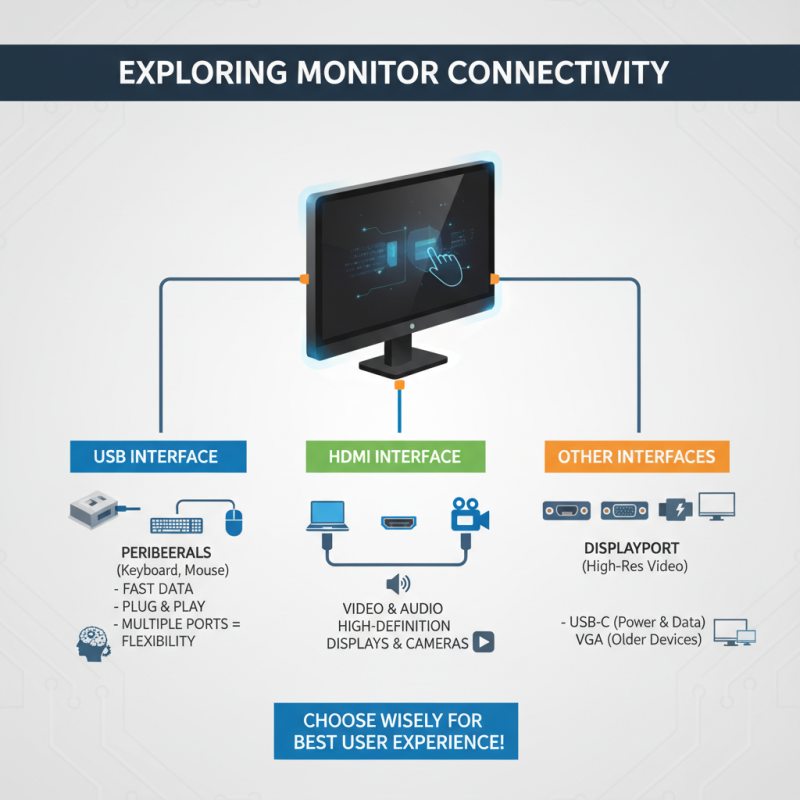
Exploring Connectivity Options: USB, HDMI, and Other Interfaces
When choosing an LCD touch monitor, the connectivity options are crucial. USB, HDMI, and other interfaces can greatly affect your user experience. USB ports are essential for connecting peripherals like keyboards and mice. They provide fast data transfer and easy plug-and-play functionality. Multiple USB ports allow for greater flexibility, especially in a busy workspace.
HDMI is another key feature to consider. It offers high-definition picture and sound quality. This is vital for interactive tasks, such as presentations or creative work. When selecting a monitor, check the version of HDMI supported. Newer versions often support better resolutions. Some monitors may also include DisplayPort, which can deliver similar quality.
Think about how you'll use your monitor. If portability is important, a lightweight model with ample connectivity is ideal. Sometimes, monitors may lack the ports you need. This can lead to headaches when trying to connect various devices. Reflect on future needs. An investment in a versatile monitor can save you from limitations down the road. Be critical and deliberate in your choice.