What is a Display Touch Panel and How Does It Work?
A Display Touch Panel is a vital component in modern technology. It allows users to interact with devices through touch. This interface is found in smartphones, tablets, and kiosks. Understanding its function and importance is crucial for both consumers and developers.
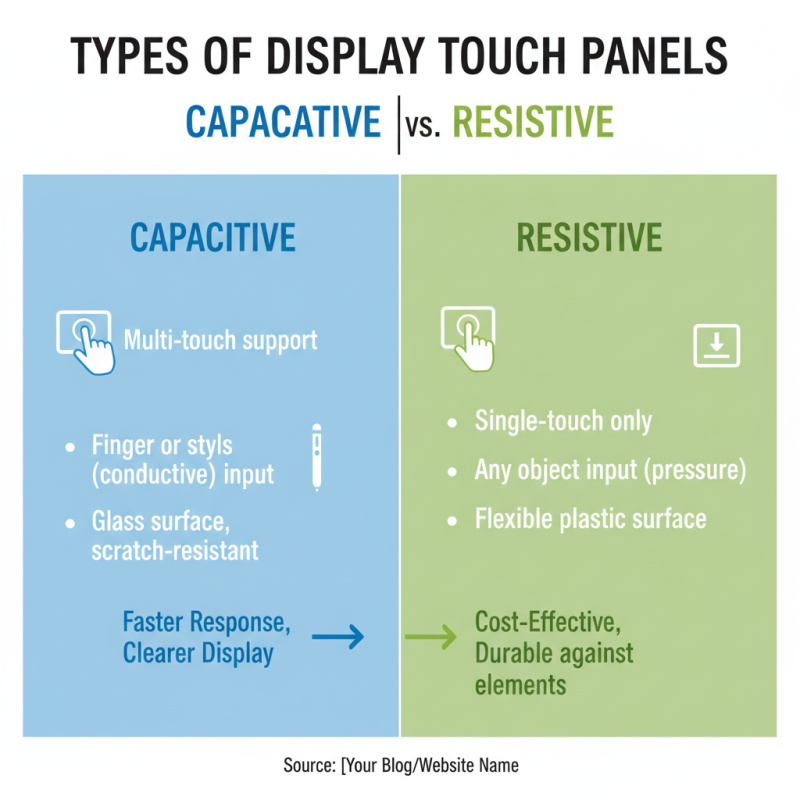
Display Touch Panels operate through various technologies, including capacitive and resistive systems. Capacitive panels detect touch through electrical charges. They are more responsive and support multi-touch gestures. Resistive panels, on the other hand, require pressure to register touch. Each type serves different applications and environments.
Many users may take this technology for granted. However, the impact of Display Touch Panels is significant. They enhance user experience and accessibility. Despite their prevalence, challenges remain in terms of durability and responsiveness. Exploring the intricacies of Display Touch Panels sheds light on how they shape our interaction with digital devices.

Definition of a Display Touch Panel
A display touch panel is an interactive screen that allows users to navigate and control devices through touch. It serves as both a display and a tactile interface, enabling users to engage with digital content seamlessly. A typical touch panel captures input directly from a user’s fingers, translating gestures into actions.
Touch panels use various technologies. Capacitive touch panels react to the electrical properties of the human body. Resistive panels respond to pressure applied to the screen. Each type has its advantages and drawbacks. Understanding these can help in choosing the right panel for a specific application.
Tips: When selecting a touch panel, consider the environment where it will be used. A resistive panel may work better in outdoor settings, while a capacitive panel is often more responsive indoors. Also, think about the size of the display. Larger screens can provide a more engaging user experience, but can be more prone to accidental touches. Making informed choices can enhance functionality while considering user comfort.
Types of Display Touch Panels: Capacitive vs. Resistive
Touch panels have become essential in modern technology. Two main types exist: capacitive and resistive. Each type has distinct characteristics that influence user experience and application.
Capacitive touch panels utilize the electrical properties of the human body. When a finger touches the surface, it disrupts the electrostatic field. This type responds quickly and supports multi-touch gestures. It's common in smartphones and tablets. They provide a smooth interface, but they can be less effective when used with gloves or styluses.
On the other hand, resistive touch panels rely on pressure. They consist of two flexible layers separated by a small gap. When pressure is applied, the layers make contact, registering the touch. This type is durable and works with any pointing device. However, it may not be as sensitive or provide the same clarity as capacitive screens. Users sometimes find that the experience feels less intuitive. Understanding these differences is crucial for selecting the right touch technology for specific needs.
Working Principles of Touch Technology in Display Panels
Display touch panels are becoming standard in many devices today. They respond to touch, allowing users to interact with screens intuitively. The core technology relies on a few working principles, commonly resistive or capacitive systems.
In capacitive touch panels, an electrical field is created on the screen. When a finger touches the panel, it disrupts this field. Sensors detect the change and trace the touch location. This method is sensitive and supports multi-touch gestures. Resistive panels work differently. They consist of multiple layers, with two conductive surfaces that come together upon pressure. This technology is less sensitive but works in various conditions.
Tips: Keep your fingers clean when using touch displays. This helps prevent smudges and extends the display's life. Also, avoid using sharp objects on the screen. They can cause scratches and damage sensitive components.
While touch technology is advanced, it isn't without flaws. False touches can happen, leading to frustration. Sometimes, environmental factors like humidity affect responsiveness. Understanding these limitations can enhance user experience, allowing for better adaptation.
Applications of Display Touch Panels in Various Industries
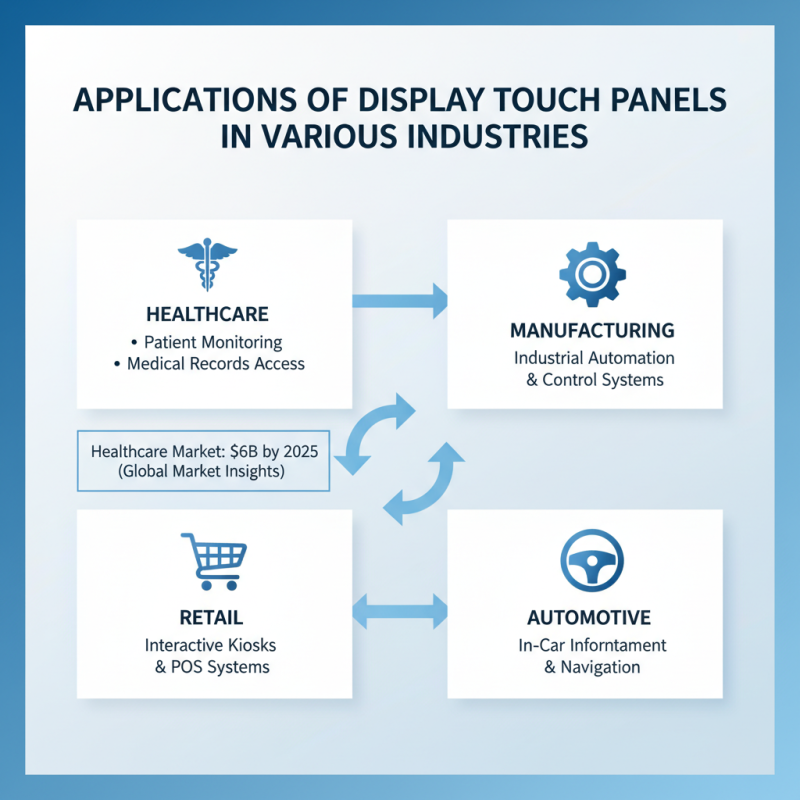
Display touch panels have become integral in various industries, transforming user interaction. In healthcare, touch panels facilitate patient monitoring systems, allowing quick access to medical records. A report by Global Market Insights indicates that the healthcare touch panel market is expected to reach $6 billion by 2025, showcasing significant growth.
In retail, touch panels enhance customer experiences through interactive kiosks and digital signage. They enable seamless transactions and personalized promotions. Research from Grand View Research notes that the global retail touch panel market is anticipated to grow at a CAGR of 9.5% from 2023 to 2030. However, businesses must ensure that these systems are user-friendly and secure, addressing potential technical glitches.
**Tip:** Regular maintenance of touch panels can prevent operational downtimes.
The education sector utilizes touch panels for interactive learning experiences. They foster collaboration and engagement among students. However, some educators report challenges with technical difficulties and training needs. This underlines the importance of proper implementation strategies.
**Tip:** Investing in training for staff can enhance the effectiveness of touch panel technology.
Growing reliance on touch panels raises concerns over privacy and data security. As technology evolves, industries must remain vigilant in safeguarding sensitive information. The focus should be on reliable systems that balance innovation with user protection.
Advantages and Limitations of Display Touch Panels
Touch panels are essential in modern displays, enhancing user interaction. They come with various advantages but also present limitations. A key benefit lies in their intuitive interface. Users engage directly with what they see, making navigation effortless. According to a recent report by Grand View Research, the global touch panel market is expected to reach $60 billion by 2025, reflecting strong demand across sectors like consumer electronics and automotive.
However, touch panels are not without their drawbacks. One significant issue is their vulnerability to scratches and fingerprints. This can diminish visibility and user experience over time. Additionally, touch panels may struggle in extreme conditions, such as direct sunlight or cold temperatures, affecting their responsiveness. As the technology evolves, addressing these limitations becomes crucial for manufacturers to maintain user satisfaction.
Tips: To prolong the life of your touch panel, consider using a screen protector. Regular cleaning can help maintain clarity. Also, assess your usage environment before selecting a touch panel, as ambient conditions can impact performance. Always weigh the advantages against the limitations to make informed decisions.