How to Choose the Right Capacitive Touch Screen for Your Project?
When diving into the world of technology, selecting the right Capacitive Touch Screen can feel overwhelming. Industry expert Dr. Emily Carter emphasizes, "The ideal touch screen depends on your specific needs." This insight underscores the importance of evaluating various factors before making a decision.
Capacitive Touch Screens are known for their responsiveness and clarity. They are widely used in smartphones, kiosks, and industrial applications. However, not all models are created equal. Depending on your project's requirements, features like sensitivity, size, and durability can vary significantly. It's essential to consider these variables carefully to avoid costly mistakes.
Moreover, understanding the technology behind these screens adds another layer of complexity. While many models offer impressive specifications, they might not execute well in real-world scenarios. Users often face challenges in finding a screen that balances performance and cost. This process requires thorough research and critical thinking to ensure the right match for your project.
Understanding Capacitive Touch Screen Technology
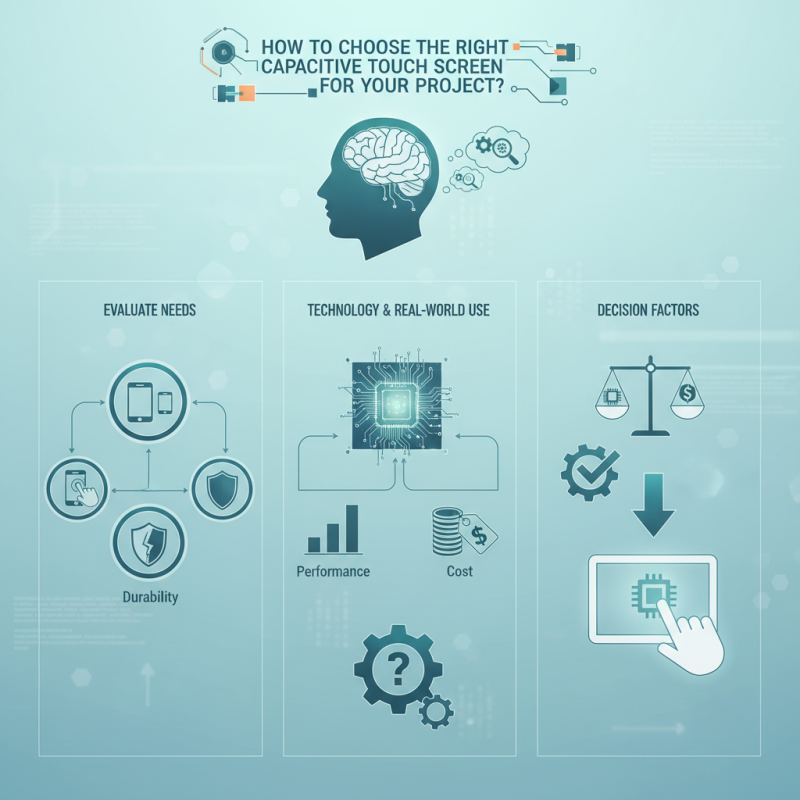
Capacitive touch screen technology has revolutionized user interfaces across various devices. Unlike resistive screens, capacitive touch screens rely on the electrical properties of the human body. This technology enables multi-touch capabilities and offers a higher level of sensitivity. According to industry reports, the global capacitive touch screen market is expected to grow at a CAGR of over 10% from 2021 to 2026. This underscores the significance and reliability of capacitive screens in modern applications.
When choosing a capacitive touch screen, consider the size and resolution. A larger screen with a higher resolution enhances user experience. Touch sensitivity is another critical factor. Sometimes, high sensitivity can lead to unintended touches. Striking a balance is essential. Performance can vary based on environmental conditions, such as humidity and temperature. Therefore, testing in your project's specific conditions is vital.
**Tip:** Always review user feedback and technical specifications before purchasing. A good screen should offer a balance of durability and sensitivity.
Explore options for different coatings and finishes. Antiglare coatings can reduce reflections but may affect touch sensitivity. Different manufacturing techniques can lead to various outcomes in functionality and appearance. Testing prototypes can provide insight into real-world performance. Make adjustments based on these evaluations for optimal results.
Identifying Your Project Requirements and Specifications
When selecting a capacitive touch screen, understanding your project requirements is crucial. Start by defining the screen size. A larger screen may enhance user interaction, but it can also increase costs. Consider the space available in your project. An oversized screen may not fit well in compact designs. Keep in mind the user environment. For outdoor use, higher brightness and anti-glare features are must-haves.
Next, think about sensitivity and multi-touch capabilities. If your application requires gesture recognition, ensure the screen supports multiple touch points. This can complicate the design, as you may need additional processing power. Evaluate how the touch screen will interface with other components. Compatibility is vital for seamless integration. Sometimes engineers overlook this, leading to frustrating delays.
Lastly, assess the durability needed for your setup. Some projects demand screens that withstand harsh conditions. A more robust screen generally comes at a higher price. In contrast, a less durable model might save costs but require more frequent replacements. Reflect on the balance between quality and budget. Making the right choice requires careful consideration of all these factors to avoid pitfalls later on.
Evaluating Different Types of Capacitive Touch Screens
When evaluating different types of capacitive touch screens, several factors come into play. Consider the technology behind the capacitive touch screen. There are two main types:
projected capacitive and surface capacitive.
Projected capacitive screens offer better sensitivity and multi-touch capabilities.
However, they tend to be more expensive.
Surface capacitive screens are often simpler and less costly but may lack advanced features.
Next, assess the environmental conditions where the touch screen will be used. If the screen will be exposed to moisture or harsh conditions, choose a screen with an IP rating that suits your needs. Look for screens designed for outdoor use if sunlight will be an issue.
These screens are typically brighter and more resistant to glare.
This aspect is crucial; a poorly chosen screen can lead to frustration and decreased usability.
Additionally, consider the size and resolution of the display. Larger screens can provide a better user experience but may require more power. Think about how the screen will fit into your project design.
Larger screens could dominate the space and affect aesthetics.
Always balance functionality with the design to ensure the touch screen enhances the overall project.
Comparing Cost and Performance Metrics
When selecting a capacitive touch screen, understanding cost and performance metrics is crucial. A report by Display Research indicates that the average cost of capacitive touch screens ranges between $10 and $50 per unit, depending on size and specifications. This variability presents both challenges and opportunities. Projects with tight budgets might limit the choice to lower-cost options, but this can lead to compromises in responsiveness and durability.
Performance is not solely based on cost. Research from MarketsandMarkets suggests that the global touch screen market is projected to reach $82 billion by 2025. With advancements in technology, higher-end capacitive screens offer enhanced sensitivity and multitouch capabilities. However, achieving optimal performance may require a careful balance between screen quality and application requirements.
Finding a touch screen that fits your specific needs often involves trade-offs. For example, better-performing screens can significantly increase project costs. Additionally, the integration process might confront issues such as compatibility and responsiveness. Engaging in thorough testing and user feedback can uncover these imperfections. Understanding your project's unique requirements will help navigate this complex landscape effectively.
How to Choose the Right Capacitive Touch Screen for Your Project? - Comparing Cost and Performance Metrics
| Metric |
Budget Option (Cost: $) |
Mid-Range Option (Cost: $) |
High-End Option (Cost: $) |
| Size (Inches) |
7 |
10 |
15 |
| Resolution (Pixels) |
800x480 |
1280x800 |
1920x1080 |
| Touch Points |
1 |
5 |
10 |
| Response Time (ms) |
60 |
30 |
10 |
| Durability (Touch Cycles) |
1,000,000 |
3,000,000 |
10,000,000 |
| Operating Temperature (°C) |
-20 to 60 |
-10 to 70 |
-40 to 85 |
Analyzing Compatibility with Hardware and Software Systems
When selecting a capacitive touch screen, compatibility with hardware and software is crucial. Your project’s hardware specifications should align with the touch screen interface. Check for compatibility in terms of voltage levels, connection types, and data protocols. A mismatched connection can lead to unreliable performance. Ensure that the microcontroller or processor you choose can handle the touch screen's data throughput effectively.
Software considerations are equally important. The operating system must support the touch technology you are implementing. Some systems require specific drivers or libraries to function correctly. Confirm that your software environment can accommodate the screen's touch capabilities. Testing early prevents costly adjustments later. Many projects experience setbacks due to overlooked software requirements. It’s essential to address these aspects ahead of time.
Lastly, consider the user experience. A touch screen should respond quickly to user inputs. If there's a lag, it can confuse users or render the interface frustrating. Understanding both hardware and software compatibility ensures a more stable and enjoyable user experience. Always leave room for revisions. Incompatibility might arise unexpectedly, and being prepared will smooth the adaptation process.
Comparative Analysis of Touch Screen Technologies